# ArrayBuffer, binary arrays
<<<<<<< HEAD
Web 開発では、ファイル(作成、更新、ダウンロード)を処理するときにバイナリデータに出くわします。その他の典型的なユースケースは画像処理です。
これらはすべて JavaScript で可能です。また、バイナリ操作も高性能です。
ですが、多くのクラスが存在するため少し混乱しやすいです。いくつか例を挙げます:
- `ArrayBuffer`, `Uint8Array`, `DataView`, `Blob`, `File`, etc.
JavaScript でのバイナリデータは、他の言語と比べて非標準的な方法で実装されています。しかし、一度整理できれば、すべてがとても簡単になります。
**基本となるバイナリオブジェクトは `ArrayBuffer` です。これは固定長の連続したメモリ領域への参照です。**
次のようにして生成できます:
```js run
let buffer = new ArrayBuffer(16); // 長さ 16 のバッファを作成
alert(buffer.byteLength); // 16
```
16バイトの連続したメモリ領域が割り当てられ、事前にゼロで埋められます。
```warn header="`ArrayBuffer` は何かの配列ではありません"
混乱の元は排除しましょう。`ArrayBuffer` は `Array` とは何の共通点もありません。:
- 長さは固定で、増減することはできません。
- メモリの中で、長さちょうどのスペースをとります。
- 個々のバイトにアクセスするには、`buffer[index]` ではなく、別の "view" オブジェクトが必要です。
```
`ArrayBuffer` はメモリ領域です。何が格納されているでしょう?それは分かりません。単に生のバイト列です。
**`ArrayBuffer` を操作するには、"ビュー(view)" オブジェクトを使用する必要があります。**
ビューオブジェクトは自身には何も格納しません。それは `ArrayBuffer` に格納されたバイトへの解釈を与える "メガネ" です。
例:
- **`Uint8Array`** -- `ArrayBuffer` にある各バイトを、 0 から 255 (1バイトは8ビット)までの値となる、別々の数として扱います。このような値は "8ビット符号なし整数(8-bit unsigned integer)" と呼ばれます。
- **`Uint16Array`** -- 各2バイトを、0 から 65535 までの値となる整数として扱います。これは "16ビット符号なし整数" と呼ばれます。
- **`Uint32Array`** -- 各4バイトを 0 から 4294967295 までの値となる整数として扱います。これは "32ビット符号なし整数" と呼ばれます。
- **`Float64Array`** -- 各8バイトを 5.0x10-324 から 1.8x10308 までの値となる浮動小数点として扱います。
したがって、16バイトの `ArrayBuffer` にあるバイナリデータは 16 個の "小さい数字", あるいは 8 個のより大きい数字(2バイトずつ), または 4 個のより大きな数字(4バイトずつ), 高精度の2個の浮動小数点値(8バイトずつとして解釈できます。
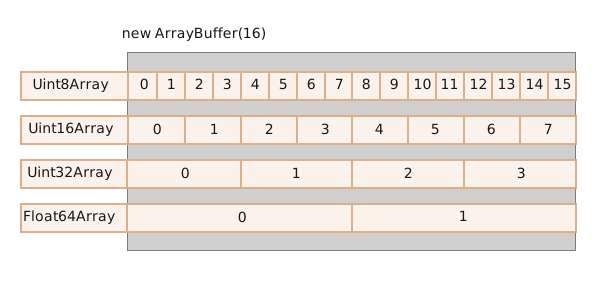
`ArrayBuffer` はコアとなるオブジェクト、すべてのもののルート、生のバイナリデータです。
ですが、そこに書き込んだり反復しようとする場合、基本的にほぼすべての操作に対して、ビューを使用する必要があります。e.g:
```js run
let buffer = new ArrayBuffer(16); // 長さ 16 のバッファを作成
*!*
let view = new Uint32Array(buffer); // 32 ビット整数列としてバッファを扱います
alert(Uint32Array.BYTES_PER_ELEMENT); // 4 バイト毎の整数
*/!*
alert(view.length); // 4, 多くの整数が格納されます
alert(view.byteLength); // 16, バイトサイズ
// 値の書き込み
view[0] = 123456;
// 値のイテレート
for(let num of view) {
alert(num); // 123456, 次に 0, 0, 0 (全部で 4 つの値)
=======
In web-development we meet binary data mostly while dealing with files (create, upload, download). Another typical use case is image processing.
That's all possible in JavaScript, and binary operations are high-performant.
Although, there's a bit of confusion, because there are many classes. To name a few:
- `ArrayBuffer`, `Uint8Array`, `DataView`, `Blob`, `File`, etc.
Binary data in JavaScript is implemented in a non-standard way, compared to other languages. But when we sort things out, everything becomes fairly simple.
**The basic binary object is `ArrayBuffer` -- a reference to a fixed-length contiguous memory area.**
We create it like this:
```js run
let buffer = new ArrayBuffer(16); // create a buffer of length 16
alert(buffer.byteLength); // 16
```
This allocates a contiguous memory area of 16 bytes and pre-fills it with zeroes.
```warn header="`ArrayBuffer` is not an array of something"
Let's eliminate a possible source of confusion. `ArrayBuffer` has nothing in common with `Array`:
- It has a fixed length, we can't increase or decrease it.
- It takes exactly that much space in the memory.
- To access individual bytes, another "view" object is needed, not `buffer[index]`.
```
`ArrayBuffer` is a memory area. What's stored in it? It has no clue. Just a raw sequence of bytes.
**To manipulate an `ArrayBuffer`, we need to use a "view" object.**
A view object does not store anything on its own. It's the "eyeglasses" that give an interpretation of the bytes stored in the `ArrayBuffer`.
For instance:
- **`Uint8Array`** -- treats each byte in `ArrayBuffer` as a separate number, with possible values from 0 to 255 (a byte is 8-bit, so it can hold only that much). Such value is called a "8-bit unsigned integer".
- **`Uint16Array`** -- treats every 2 bytes as an integer, with possible values from 0 to 65535. That's called a "16-bit unsigned integer".
- **`Uint32Array`** -- treats every 4 bytes as an integer, with possible values from 0 to 4294967295. That's called a "32-bit unsigned integer".
- **`Float64Array`** -- treats every 8 bytes as a floating point number with possible values from 5.0x10-324 to 1.8x10308.
So, the binary data in an `ArrayBuffer` of 16 bytes can be interpreted as 16 "tiny numbers", or 8 bigger numbers (2 bytes each), or 4 even bigger (4 bytes each), or 2 floating-point values with high precision (8 bytes each).

`ArrayBuffer` is the core object, the root of everything, the raw binary data.
But if we're going to write into it, or iterate over it, basically for almost any operation – we must use a view, e.g:
```js run
let buffer = new ArrayBuffer(16); // create a buffer of length 16
*!*
let view = new Uint32Array(buffer); // treat buffer as a sequence of 32-bit integers
alert(Uint32Array.BYTES_PER_ELEMENT); // 4 bytes per integer
*/!*
alert(view.length); // 4, it stores that many integers
alert(view.byteLength); // 16, the size in bytes
// let's write a value
view[0] = 123456;
// iterate over values
for(let num of view) {
alert(num); // 123456, then 0, 0, 0 (4 values total)
>>>>>>> ea7738bb7c3616bb51ff14ae3db2a2747d7888ff
}
```
## TypedArray
<<<<<<< HEAD
これらすべてのビュー (`Uint8Array`, `Uint32Array`, etc) の共通の用語は、[TypedArray](https://tc39.github.io/ecma262/#sec-typedarray-objects) です。これらは同じメソッドとプロパティのセットを共有します。
これらは通常の配列によく似ています: インデックスがあり、反復可能(iterable)です。
型付き配列のコンストラクタ (`Int8Array` でも `Float64Array` でも構いません)は、引数の種類に応じて異なる振る舞いをします。
5 つの引数のパターンがあります:
=======
The common term for all these views (`Uint8Array`, `Uint32Array`, etc) is [TypedArray](https://tc39.github.io/ecma262/#sec-typedarray-objects). They share the same set of methods and properties.
Please note, there's no constructor called `TypedArray`, it's just a common "umbrella" term to represent one of views over `ArrayBuffer`: `Int8Array`, `Uint8Array` and so on, the full list will soon follow.
When you see something like `new TypedArray`, it means any of `new Int8Array`, `new Uint8Array`, etc.
Typed arrays behave like regular arrays: have indexes and are iterable.
A typed array constructor (be it `Int8Array` or `Float64Array`, doesn't matter) behaves differently depending on argument types.
There are 5 variants of arguments:
>>>>>>> ea7738bb7c3616bb51ff14ae3db2a2747d7888ff
```js
new TypedArray(buffer, [byteOffset], [length]);
new TypedArray(object);
new TypedArray(typedArray);
new TypedArray(length);
new TypedArray();
```
<<<<<<< HEAD
1. `ArrayBuffer` の引数が与えられると、それに対するビューが作られます。我々はすでにその構文を使いました。
オプションで、`byteOffset` で開始位置(デフォルトは 0)、`length` で長さ(デフォルトではバッファの終わりまで) を指定することができ、その場合はビューは `buffer` の一部だけをカバーします。
2. `Array` または配列ライクなオブジェクトが与えられた場合は、同じ長さの型付き配列を生成し、内容をコピーします。
これを使って配列にデータを事前に埋め込むことができます:
=======
1. If an `ArrayBuffer` argument is supplied, the view is created over it. We used that syntax already.
Optionally we can provide `byteOffset` to start from (0 by default) and the `length` (till the end of the buffer by default), then the view will cover only a part of the `buffer`.
2. If an `Array`, or any array-like object is given, it creates a typed array of the same length and copies the content.
We can use it to pre-fill the array with the data:
>>>>>>> ea7738bb7c3616bb51ff14ae3db2a2747d7888ff
```js run
*!*
let arr = new Uint8Array([0, 1, 2, 3]);
*/!*
<<<<<<< HEAD
alert( arr.length ); // 4
alert( arr[1] ); // 1
```
3. 別の `TypedArray` が与えられた場合も同じです: 同じ長さの型付き配列を生成し、値をコピーします。値はその処理の中で新しい型に変換されます。
=======
alert( arr.length ); // 4, created binary array of the same length
alert( arr[1] ); // 1, filled with 4 bytes (unsigned 8-bit integers) with given values
```
3. If another `TypedArray` is supplied, it does the same: creates a typed array of the same length and copies values. Values are converted to the new type in the process, if needed.
>>>>>>> ea7738bb7c3616bb51ff14ae3db2a2747d7888ff
```js run
let arr16 = new Uint16Array([1, 1000]);
*!*
let arr8 = new Uint8Array(arr16);
*/!*
alert( arr8[0] ); // 1
<<<<<<< HEAD
alert( arr8[1] ); // 232 (1000 をコピーしようとしますが、1000 は 8 ビットには収まりません(1000 は 11 1110 1000, 232 は 1110 1000)
```
4. 数値引数の場合は `length` であり、その数の要素を含む型付き配列を作成します。そのバイト長は、一つあたりのアイテムのバイト数 `TypedArray.BYTES_PER_ELEMENT` が `length` 倍されたものになります。:
```js run
let arr = new Uint16Array(4); // 長さ 4 の型付き配列を作成します。
alert( Uint16Array.BYTES_PER_ELEMENT ); // 要素あたり 2 バイトです
alert( arr.byteLength ); // 8 (バイトサイズ)
```
5. 引数がなければ、長さゼロの型付き配列を作成します。
`ArrayBuffer` に言及することなく、直接 `TypedArray` を作成することができます。しかし、ビューはその根底にある `ArrayBuffer` なしでは存在できないため、最初のケース(`ArrayBuffer` が与えられた場合)を除く、すべての場合に自動的に作成されます。
`ArrayBuffer` にアクセスするには、次のプロパティを使います:
- `arr.buffer` -- `ArrayBuffer` への参照です。
- `arr.byteLength` -- `ArrayBuffer` の長さです。
そのため、いつでもあるビューから別のビューへ移動させることができます。:
```js
let arr8 = new Uint8Array([0, 1, 2, 3]);
// 同じデータを別のビューで
let arr16 = new Uint16Array(arr8.buffer);
```
型付き配列の一覧です:
- `Uint8Array`, `Uint16Array`, `Uint32Array` -- 8, 16, 32 ビット整数の場合
- `Uint8ClampedArray` -- 8ビット整数の場合、代入時に "クランプ" します (下記参照)。
- `Int8Array`, `Int16Array`, `Int32Array` -- 符号付き整数の場合(負の値になることもあります)。
- `Float32Array`, `Float64Array` -- 32, 64 ビット符号付き浮動小数点の場合。
```warn header="`int8` またはそれに類似した単一値の型はありません"
注意してください、`Int8Array` のような名前にもかかわらず、JavaScript には `int` あるいは `int8` のような単一値の型はありません。
繰り返しますが、`Int8Array` はこれらの個々の値の配列ではなく、`ArrayBuffer` のビューです。
```
### 範囲外の動作
もし範囲外の値を型付き配列に書き込もうとするとどうなるでしょう?エラーにはなりませんが、余分なビットが切り捨てられます。
例えば、256 を `Uint8Array` に置くことを考えてみましょう。二進法(バイナリ形式)では、256 は `100000000` (9ビット)ですが、`Uint8Array` は値ごとに 8 ビットしか提供せず、0 から 255 までの範囲です。
範囲を超えるようなより大きい数値の場合、(重要度の低い)右端の8ビットだけが格納され、残りは切り捨てられます。:

そのため、ゼロになります。
257 の場合、二進法は `100000001` (9ビット)で、右端の 8ビットが格納されるので、配列には `1` が入ります。:

デモです:
=======
alert( arr8[1] ); // 232, tried to copy 1000, but can't fit 1000 into 8 bits (explanations below)
```
4. For a numeric argument `length` -- creates the typed array to contain that many elements. Its byte length will be `length` multiplied by the number of bytes in a single item `TypedArray.BYTES_PER_ELEMENT`:
```js run
let arr = new Uint16Array(4); // create typed array for 4 integers
alert( Uint16Array.BYTES_PER_ELEMENT ); // 2 bytes per integer
alert( arr.byteLength ); // 8 (size in bytes)
```
5. Without arguments, creates an zero-length typed array.
We can create a `TypedArray` directly, without mentioning `ArrayBuffer`. But a view cannot exist without an underlying `ArrayBuffer`, so gets created automatically in all these cases except the first one (when provided).
To access the underlying `ArrayBuffer`, there are following properties in `TypedArray`:
- `buffer` -- references the `ArrayBuffer`.
- `byteLength` -- the length of the `ArrayBuffer`.
So, we can always move from one view to another:
```js
let arr8 = new Uint8Array([0, 1, 2, 3]);
// another view on the same data
let arr16 = new Uint16Array(arr8.buffer);
```
Here's the list of typed arrays:
- `Uint8Array`, `Uint16Array`, `Uint32Array` -- for integer numbers of 8, 16 and 32 bits.
- `Uint8ClampedArray` -- for 8-bit integers, "clamps" them on assignment (see below).
- `Int8Array`, `Int16Array`, `Int32Array` -- for signed integer numbers (can be negative).
- `Float32Array`, `Float64Array` -- for signed floating-point numbers of 32 and 64 bits.
```warn header="No `int8` or similar single-valued types"
Please note, despite of the names like `Int8Array`, there's no single-value type like `int`, or `int8` in JavaScript.
That's logical, as `Int8Array` is not an array of these individual values, but rather a view on `ArrayBuffer`.
```
### Out-of-bounds behavior
What if we attempt to write an out-of-bounds value into a typed array? There will be no error. But extra bits are cut-off.
For instance, let's try to put 256 into `Uint8Array`. In binary form, 256 is `100000000` (9 bits), but `Uint8Array` only provides 8 bits per value, that makes the available range from 0 to 255.
For bigger numbers, only the rightmost (less significant) 8 bits are stored, and the rest is cut off:

So we'll get zero.
For 257, the binary form is `100000001` (9 bits), the rightmost 8 get stored, so we'll have `1` in the array:

In other words, the number modulo 28 is saved.
Here's the demo:
>>>>>>> ea7738bb7c3616bb51ff14ae3db2a2747d7888ff
```js run
let uint8array = new Uint8Array(16);
let num = 256;
<<<<<<< HEAD
alert(num.toString(2)); // 100000000 (二進表現)
=======
alert(num.toString(2)); // 100000000 (binary representation)
>>>>>>> ea7738bb7c3616bb51ff14ae3db2a2747d7888ff
uint8array[0] = 256;
uint8array[1] = 257;
alert(uint8array[0]); // 0
alert(uint8array[1]); // 1
```
<<<<<<< HEAD
`Uint8ClampedArray` はこの点で特別で異なる振る舞いをします。これは、255 よりも大きな値の場合は 255 を、負の値の場合には 0 を格納します。これは画像処理の場合に役立つ振る舞いです。
## TypedArray メソッド
`TypedArray` は通常の `Array` のメソッドを持っていますが、注目すべき例外があります。
`map`, `slice`, `find`, `reduce` 等を使用してイテレートすることができます。
ですが、できないことがいくつかあります:
- `splice` はありません。型付き配列は buffer のビューであり、これらは固定された連続したメモリ領域であるため、値を "削除" することはできません。できることは、ゼロの代入です。
- `concat` メソッドはありません。
2つの追加のメソッドがあります:
- `arr.set(fromArr, [offset])` は `fromArr` のすべての要素を `arr` へ、位置 `offset` (デフォルトは 0) を開始点としてコピーします。
- `arr.subarray([begin, end])` は `begin` から `end` (排他的)までの同じ型のビューを作成します。これは `slice` メソッドに似ています(このメソッドもサポートされています)が、何もコピーしません。単に指定されたデータ範囲を操作するための新しいビューを作成するだけです。
これらのメソッドにより、型付き配列のコピーしたり、ミックスしたり、既存の配列から新しい配列を作成したりすることができます。
## DataView
[DataView](https://developer.mozilla.org/en-US/docs/Web/JavaScript/Reference/Global_Objects/DataView) は非常に柔軟な `ArrayBuffer` に対する "型指定のない" ビューです。あらゆるフォーマットの任意のオフセットのデータにアクセスすることができます。
- 型付き配列の場合、コンストラクタはフォーマットが何であるかを決定します。配列全体は不変になります。i 番目の数値は `arr[i]` です。
- `DataView` では、`.getUint8(i)` や `.getUint16(i)` メソッドでデータにアクセスします。フォーマットはコンストラクタ時の代わりに、メソッド呼び出し時に指定します。
構文:
=======
`Uint8ClampedArray` is special in this aspect, its behavior is different. It saves 255 for any number that is greater than 255, and 0 for any negative number. That behavior is useful for image processing.
## TypedArray methods
`TypedArray` has regular `Array` methods, with notable exceptions.
We can iterate, `map`, `slice`, `find`, `reduce` etc.
There are few things we can't do though:
- No `splice` -- we can't "delete" a value, because typed arrays are views on a buffer, and these are fixed, contiguous areas of memory. All we can do is to assign a zero.
- No `concat` method.
There are two additional methods:
- `arr.set(fromArr, [offset])` copies all elements from `fromArr` to the `arr`, starting at position `offset` (0 by default).
- `arr.subarray([begin, end])` creates a new view of the same type from `begin` to `end` (exclusive). That's similar to `slice` method (that's also supported), but doesn't copy anything -- just creates a new view, to operate on the given piece of data.
These methods allow us to copy typed arrays, mix them, create new arrays from existing ones, and so on.
## DataView
[DataView](mdn:/JavaScript/Reference/Global_Objects/DataView) is a special super-flexible "untyped" view over `ArrayBuffer`. It allows to access the data on any offset in any format.
- For typed arrays, the constructor dictates what the format is. The whole array is supposed to be uniform. The i-th number is `arr[i]`.
- With `DataView` we access the data with methods like `.getUint8(i)` or `.getUint16(i)`. We choose the format at method call time instead of the construction time.
The syntax:
>>>>>>> ea7738bb7c3616bb51ff14ae3db2a2747d7888ff
```js
new DataView(buffer, [byteOffset], [byteLength])
```
<<<<<<< HEAD
- **`buffer`** -- 基礎となる `ArrayBuffer` です。型付き配列とは異なり、`DataView` はそれ自身では buffer は作成しません。事前に用意する必要があります。
- **`byteOffset`** -- ビューの開始バイト位置(デフォルトは 0)です。
- **`byteLength`** -- ビューのバイト長(デフォルトは `buffer` の最後まで)です。
例えば、ここでは同じバッファから異なるフォーマットで数値を取り出します。:
```js run
=======
- **`buffer`** -- the underlying `ArrayBuffer`. Unlike typed arrays, `DataView` doesn't create a buffer on its own. We need to have it ready.
- **`byteOffset`** -- the starting byte position of the view (by default 0).
- **`byteLength`** -- the byte length of the view (by default till the end of `buffer`).
For instance, here we extract numbers in different formats from the same buffer:
```js run
// binary array of 4 bytes, all have the maximal value 255
>>>>>>> ea7738bb7c3616bb51ff14ae3db2a2747d7888ff
let buffer = new Uint8Array([255, 255, 255, 255]).buffer;
let dataView = new DataView(buffer);
<<<<<<< HEAD
// オフセット 0 で、8ビットの数値を取得します
alert( dataView.getUint8(0) ); // 255
// オフセット 0 で、16ビットの数値を取得します、つまり 2バイトです
alert( dataView.getUint16(0) ); // 65535 (16ビット符号なし整数の最大値)
// オフセット 0 で、32ビットの数値を取得します
alert( dataView.getUint32(0) ); // 4294967295 (32ビット符号なし整数の最大値)
dataView.setUint32(0, 0); // 4バイトの数値を 0 にセット
```
`DataView` はフォーマットが混在したデータを同じバッファに格納するときに役立ちます。E.g 一連のペア(16ビット整数、32ビット float)を格納します。その後、`DataView` は簡単にそれらにアクセスすることができます。
## サマリ
`ArrayBuffer` は基本となるオブジェクトで、固定長の連続したメモリ領域への参照です。
`ArrayBuffer` に対するほとんどの操作は、次のビューが必要です。
- `TypedArray`:
- `Uint8Array`, `Uint16Array`, `Uint32Array` -- 8, 16 あるいは 32 ビットの符号なし整数の場合
- `Uint8ClampedArray` -- 8 ビット整数の場合。代入時に "クランプ" します
- `Int8Array`, `Int16Array`, `Int32Array` -- 符号あり整数値の場合(負の値もあり)
- `Float32Array`, `Float64Array` -- 32, 64 ビット符号あり浮動小数点
- もしくは `DataView` -- フォーマットを指定するメソッドを使用するビューです。例えば、`getUint8(offset)`.
多くの場合、`ArrayBuffer` を隠したまま、直接型付き配列を作成し操作します。`.buffer` でアクセスすることができ、必要に応じて別のビューを作成することができます。
その他に2つの用語があります:
- `ArrayBufferView` はこれらすべての種類のビューの総称です。
- `BufferSource` は `ArrayBuffer` もしくは `ArrayBufferView` の総称です。
これらはバイナリデータを操作するメソッドの説明で使用されています。`BufferSource` は最も一般的な用語で、"あらゆる種類のバイナリデータ" -- `ArrayBuffer` またはそれを覆うビュー、を意味します。
チートシートです:
=======
// get 8-bit number at offset 0
alert( dataView.getUint8(0) ); // 255
// now get 16-bit number at offset 0, it consists of 2 bytes, together interpreted as 65535
alert( dataView.getUint16(0) ); // 65535 (biggest 16-bit unsigned int)
// get 32-bit number at offset 0
alert( dataView.getUint32(0) ); // 4294967295 (biggest 32-bit unsigned int)
dataView.setUint32(0, 0); // set 4-byte number to zero, thus setting all bytes to 0
```
`DataView` is great when we store mixed-format data in the same buffer. For example, when we store a sequence of pairs (16-bit integer, 32-bit float), `DataView` allows to access them easily.
## Summary
`ArrayBuffer` is the core object, a reference to the fixed-length contiguous memory area.
To do almost any operation on `ArrayBuffer`, we need a view.
- It can be a `TypedArray`:
- `Uint8Array`, `Uint16Array`, `Uint32Array` -- for unsigned integers of 8, 16, and 32 bits.
- `Uint8ClampedArray` -- for 8-bit integers, "clamps" them on assignment.
- `Int8Array`, `Int16Array`, `Int32Array` -- for signed integer numbers (can be negative).
- `Float32Array`, `Float64Array` -- for signed floating-point numbers of 32 and 64 bits.
- Or a `DataView` -- the view that uses methods to specify a format, e.g. `getUint8(offset)`.
In most cases we create and operate directly on typed arrays, leaving `ArrayBuffer` under cover, as a "common denominator". We can access it as `.buffer` and make another view if needed.
There are also two additional terms, that are used in descriptions of methods that operate on binary data:
- `ArrayBufferView` is an umbrella term for all these kinds of views.
- `BufferSource` is an umbrella term for `ArrayBuffer` or `ArrayBufferView`.
We'll see these terms in the next chapters. `BufferSource` is one of the most common terms, as it means "any kind of binary data" -- an `ArrayBuffer` or a view over it.
Here's a cheatsheet:
>>>>>>> ea7738bb7c3616bb51ff14ae3db2a2747d7888ff
